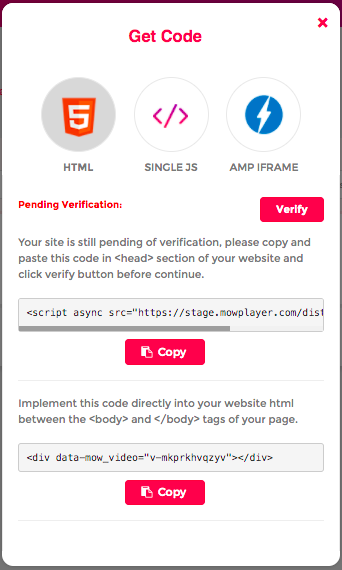
Once files are uploaded to the platform, click on Get Code icon and choose one of the options available on the pop up.
In almost all the options your site must be verified, for this you have to copy and paste the following code:
<script src="https://mowplayer.com/dist/player.js"></script>In all of your HTML pages, only one time for each site you have.
The available codes are:
- HTML
- Javascript
- AMP (exclusive for full AMP sites)
The implementation that guarantees the best performance of our videos is the HTML code, The It requires yes or yes that your site is verified correctly.
Copy and Paste the <DIV> line of code directly into the HTML of your website where you want to display your video.
Advise : In most cases you can also implement it directly in the body of the article with HTML mode on (not text) of your CMS. Check with your Account Manager in case you need additional assistance during the Implementation process.
Javascript implementation doesn't require verification of your site, Place the single Js code directly in the area of the HTML where you want to display your video.
script src="//mowplayer.com/watch/js/ v-mg4uezf6z7g .js"></script>Keep in mind : Even if your site is not verified, (but enabled) you can still use Mowplayer but that it is not the recommended implementation and we will not be able to enable the full potential of monetization under this method.
Mowplayer developed its own AMP component so if your website works FULL AMP use this code to maximize the results in this environment.
This implementation requires first having the code (AMP header) runing in the <header> tag on all your pages. If you already work with AMP this wont ben necessary.
Then implement the code in the area of your site where you want to display your videos.
<amp-mowplayerFor more information about how to work dynamically with our AMP codes you can check the AMP Implementation Guide or contact your Account Manager.
In case your website is Wordpress based , we have a plugin for this, so you can connect all the videos directly and be able to automate and speed up the uploading process. Download the plugin here.
Within the free version of Mow, the responsive behavior of the player screen is adapted to achieve the highest possible monetization, this generates a different visualization between mobile and desktop devices.
In any case, we offer multiple options to modify and adapt the player to your needs, experiment with vertical sizes and more original designs using our Player Customization Guide.
Advise : In case you need help to adapt the dimensions of your player, you can connect with your Account manager, who will help to ensure that the codes in your account are according to your needs.
The codes for the audio player are only available in Iframe format and you can directly implement this in the HTML of your website.